
Saturday, September 06, 2008
Multimedia Mini sessions
On camera tips- sit up straight
- breathe -- think of calming things
- consider a Flip video-- $150 for an hour of video
- Use your nervousness and allow it to keep you excited
- Don't "uptalk" (allowing your voice to trail up), keep your voice steady and speak with authority. Don't question what you say. Believe it.
- Think about three points you want to make -- not about stats. Think soundbites -- those are the things that draw emotion out.
- Make eye contact -- try not to use your notes
- Shut up and listen. Let the silence work for you.
- Have fun!
- Check out NYTimes reporter David Pogue, a technology writer, and his Web casts. Engaging!
- Think about what you're wearing: no sleeveless, no low cut necklines, simple, clean jewelry, DON'T wear black or white, or small intricate patterns.
SOCIAL NETWORKS
- It's the Social Mullet: Business in the Front, party in the back
- Business: LinkedIn -- get recommendations, put resume up and make contacts
- Party: Facebook -- put up those pictures of you at your college kegger, but just be sure to set your settings to 'private' so employers won't see your misdeeds (or your midsection)
- Twitter is like microblogging.
- When blogging, be tasteful and be cautious
- Google yourself! Keep in mind what shows up on your search page
- Always, always, ALWAYS set your privacy settings. Always.
BEHIND THE CAMERA TIPS
- Always white balance -- zoom in on something pure white to correct the color in your videos
- Use manual focus
- Audio check the person and adjust the volume so that you don't get spikes in the volume level when someone speaks
- when doing a 'man on the street,' make sure the mic isn't visible in the shot. Also remember that everything in the screen is a part of the story.
- Gain -- it adjusts light sensitivity on a camera. Can be used to brighten a scene if there is very little light. But be careful, it makes quality grainy (think adjusting the brightness of a photo too much)
- Establishing shots help provide context. If it's an interview, show both people sitting first, then feel free to zoom in on one person or the other.
- Adjust the camera so it moves smoothly and as you pan, zoom in so that it is all in one smooth motion.
- LISTEN -- use your journalistic discretion about when to pan and when to focus. Only zoom or move the camera with a purpose.
- Use a tripod if you can; if you can't, hold your breath while you're taking the shot or use a chair or something to steady your arms on the camera -- or if you have a large camera, sandwich the camera between your shoulders and head (a la broadcast) to help steady it.
- Action -- Never leave the scene without "B-roll" --- those supplemental shots of the subject working or (gasp!) shots of whatever you're talking about actually taking place.
- Get as much video as possible, but have a script of what you want. Do your research and know what the subject will be speaking about. If you can, WRITE DOWN THE TIME CODE when something interesting happens. It'll make it easier to find later as you edit.
WEB SITES TO VISIT:
- Journalism 2.0
- Poynter E-Media tidbits
- IWMF.com
- BNHphotovideo.com (to buy multimedia equipment
There was also a session on Flash, but it's just so complicated, I'm thinking it wouldn't do you any good to get a step by step on how to make a mini slideshow. But, do check out online tutorials at a bunch of places to get a handle on this very important program for multimedia.
Labels: broadcasting, JAWS, seminars/workshops, tech corner, technology
continue...Thursday, August 21, 2008
Aaron's Tech Corner: Microphones
While at UNITY 2008 in Chicago, Veronica and Talia were panelists on an internship forum. I captured most of it on film, and was excited to post Ten95's first video...with us in it. Alas, the sound captured with my trusty Aiptek HD-DV camcorder was terrible. (That camera, by the way, is awesome! Just not for capturing the panel.)Why?
Well, mostly because the sound system in the convention center meeting room wasn't loud enough, and I had no way of "mic-ing up" the panelists or the moderator. Soooooo...when life presents you with lemons, you make another installment of Tech Corner. (Then you drink some lemonade.)
Click on image to view.

Labels: microphones, multimedia, tech corner, unity
continue...Sunday, July 15, 2007
Aaron's Tech Corner: STORAGE
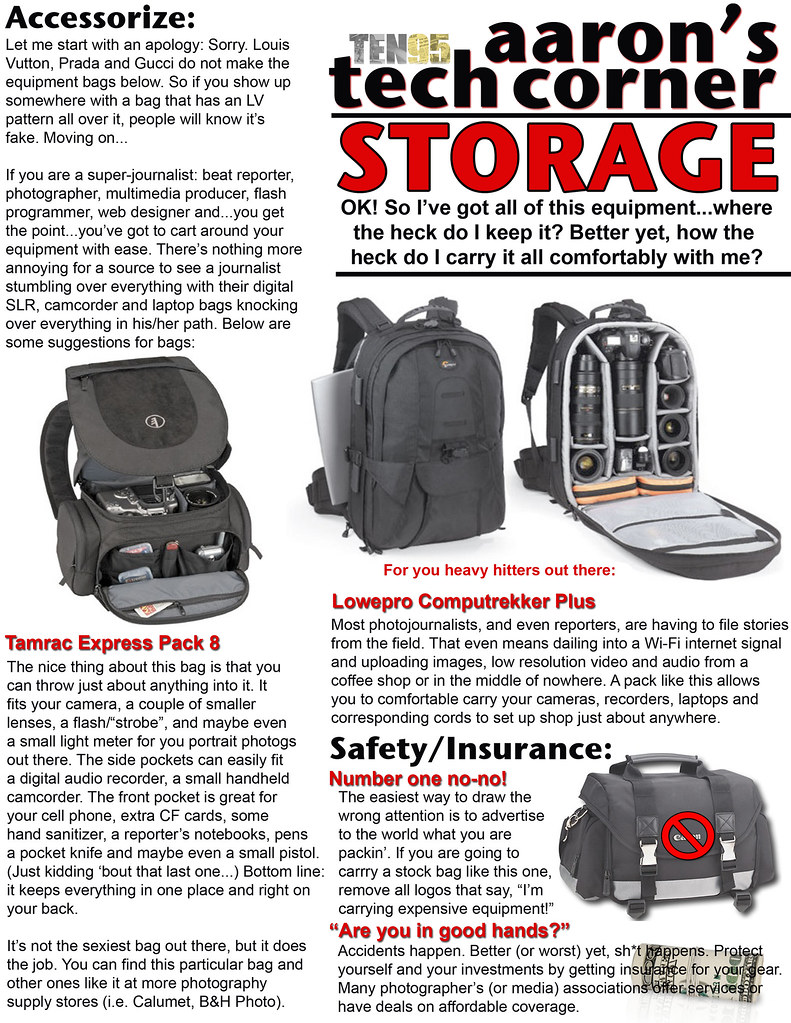
CLICK ON IMAGE
Labels: tech corner
continue...Friday, May 04, 2007
Aaron's Tech Corner: VIDEO

CLICK ON IMAGE
A colleague of mine, Poh Si Teng, runs an award-winning Malaysian news site that caters to the youth from her country. (And she's a paid NABJ member! How 'bout that?) Recently, she put together a simple video piece about Malaysian food in the U.S. She used a point and shoot similar to the Pure Digital camera that I featured in the video edition of Tech Corner. And she edited it with Windows Movie Maker. Check it out.
A colleague of mine, Poh Si Teng, runs an award-winning Malaysian news site that caters to the youth from her country. (And she's a paid NABJ member! How 'bout that?) Recently, she put together a simple video piece about Malaysian food in the U.S. She used a point and shoot similar to the Pure Digital camera that I featured in the video edition of Tech Corner. And she edited it with Windows Movie Maker. Check it out.
Labels: multimedia, tech corner
continue...Saturday, April 14, 2007
Aaron's Tech Corner: CAMERAS
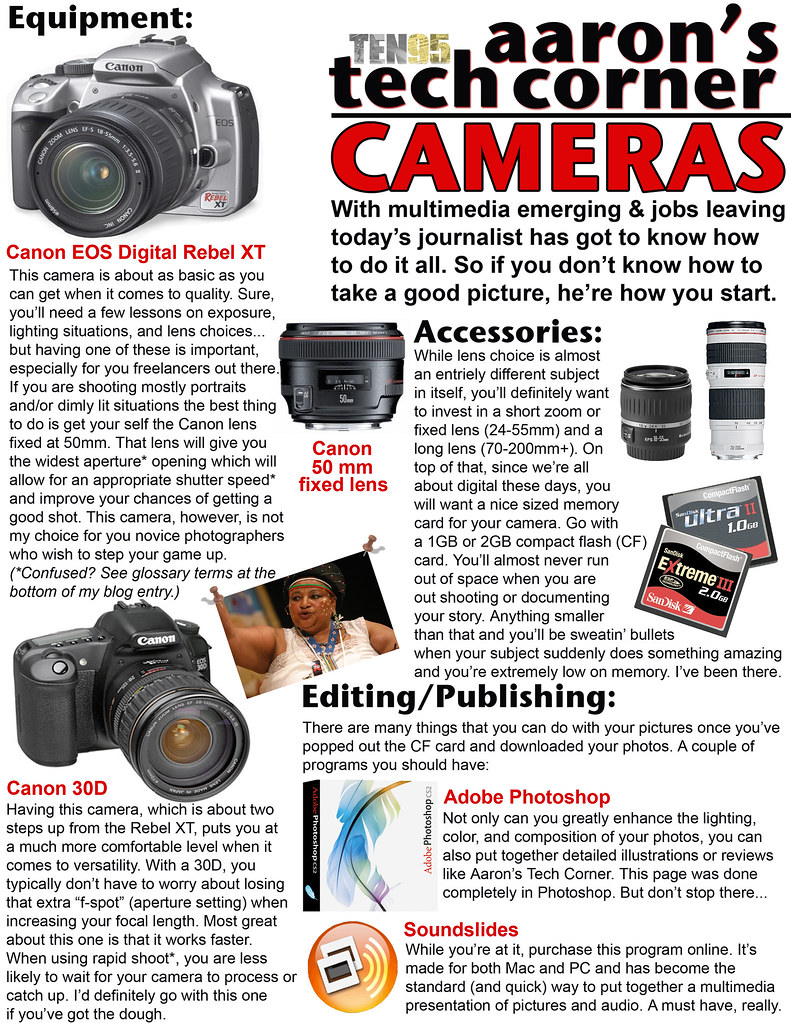
CLICK ON IMAGE
----------------------------------------------------------
GLOSSARY OF PHOTOGRAPHY TERMS
 Source: Photography, 8th Edition, co-written
by Ken Kobre, professor of photojournalism at
San Francisco State University, the school Aaron
attends. Special thanks to Sibylla Herbrich for an
excellent semester so far and to Aaron's mom,
the photographer he looks up to most.
Wondering who that is in the photo in this week's tech corner? That's Eunice Mangwane telling the story of the Keiskamma Altarpiece during its unveiling at Grace Cathedral in San Francisco on April 12. Eunice is an AIDS counselor in Hamburg, South Africa, where the altarpiece was created by 120 women of her coastal town. The altarpiece is a message of hope for people who are contending with the devastation that AIDS has wrought in the lives of the impoverished and those going through other hardships. For more about the altarpiece, visit http://www.gracecathedral.org/calendar/detail.php?eid=914.
Or look at this story: AIDS alterpiece: From sorrow to celebration.
- aperture (priority) - The size of the lens opening through which light passes, also a mode (on most digital SLR cameras) in which the photographer selects the aperture and the camera sets the shutter speed that will produce the correct exposure.
- fixed lens vs. zoom lens - with or without an adjustable range of focal lengths.
- f-stop (also f-number) - The common term for the aperture setting of a lens and/or the number that equals the focal length of a lens divided by the diameter of the aperture at a given setting. (Right over your head? Yeah, I know. Take a class.)
- shutter speed - The speed (measured length of time) at which a mechanism opens and closes to admit light into a camera.
 Source: Photography, 8th Edition, co-written
by Ken Kobre, professor of photojournalism at
San Francisco State University, the school Aaron
attends. Special thanks to Sibylla Herbrich for an
excellent semester so far and to Aaron's mom,
the photographer he looks up to most.
Wondering who that is in the photo in this week's tech corner? That's Eunice Mangwane telling the story of the Keiskamma Altarpiece during its unveiling at Grace Cathedral in San Francisco on April 12. Eunice is an AIDS counselor in Hamburg, South Africa, where the altarpiece was created by 120 women of her coastal town. The altarpiece is a message of hope for people who are contending with the devastation that AIDS has wrought in the lives of the impoverished and those going through other hardships. For more about the altarpiece, visit http://www.gracecathedral.org/calendar/detail.php?eid=914.
Or look at this story: AIDS alterpiece: From sorrow to celebration.
Labels: multimedia, tech corner
continue...Friday, April 06, 2007
Aaron's Tech Corner: AUDIO
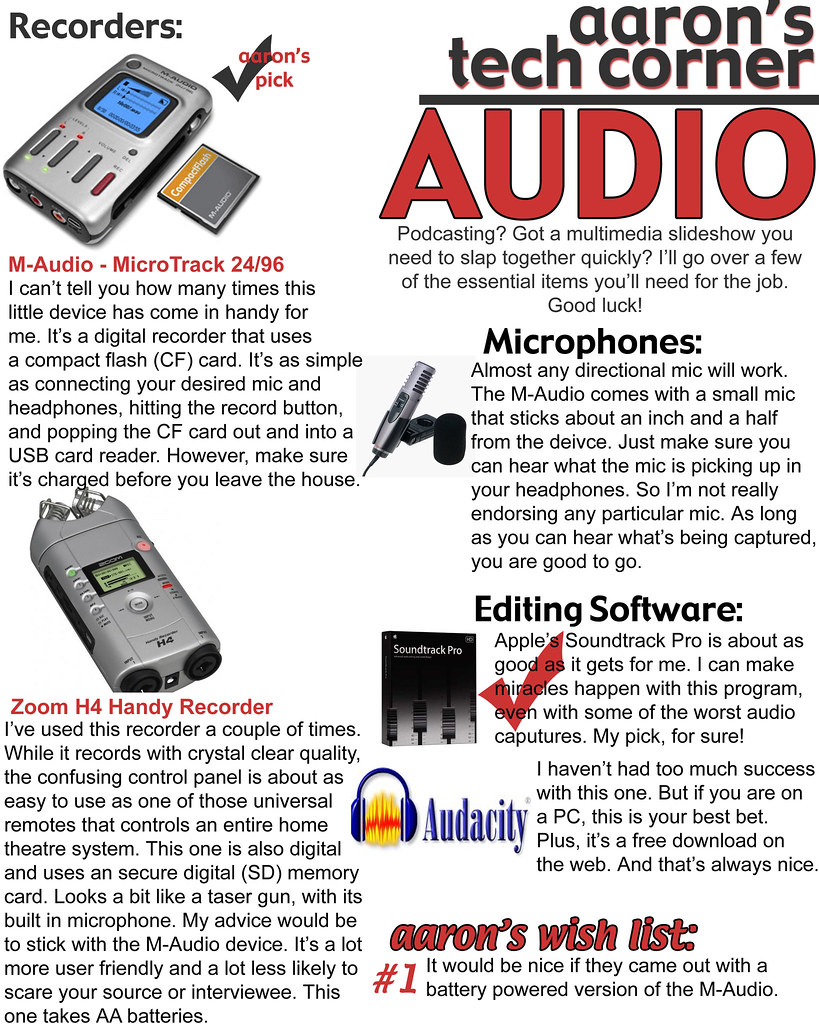 CLICK ON IMAGE
Next week I'll delve into photography. Cameras, camera, and more cameras. So important to multimedia storytelling. Stay tuned.
Labels: multimedia, tech corner
continue...